




Why Your Business Can’t Afford to Ignore Data Center Resilience
Data center disaster recovery is your organization’s ability to restore critical IT systems and operations after a major disruption—whether from natural disasters, cyberattacks, power outages, or human error. Here’s what effective data center disaster recovery encompasses:
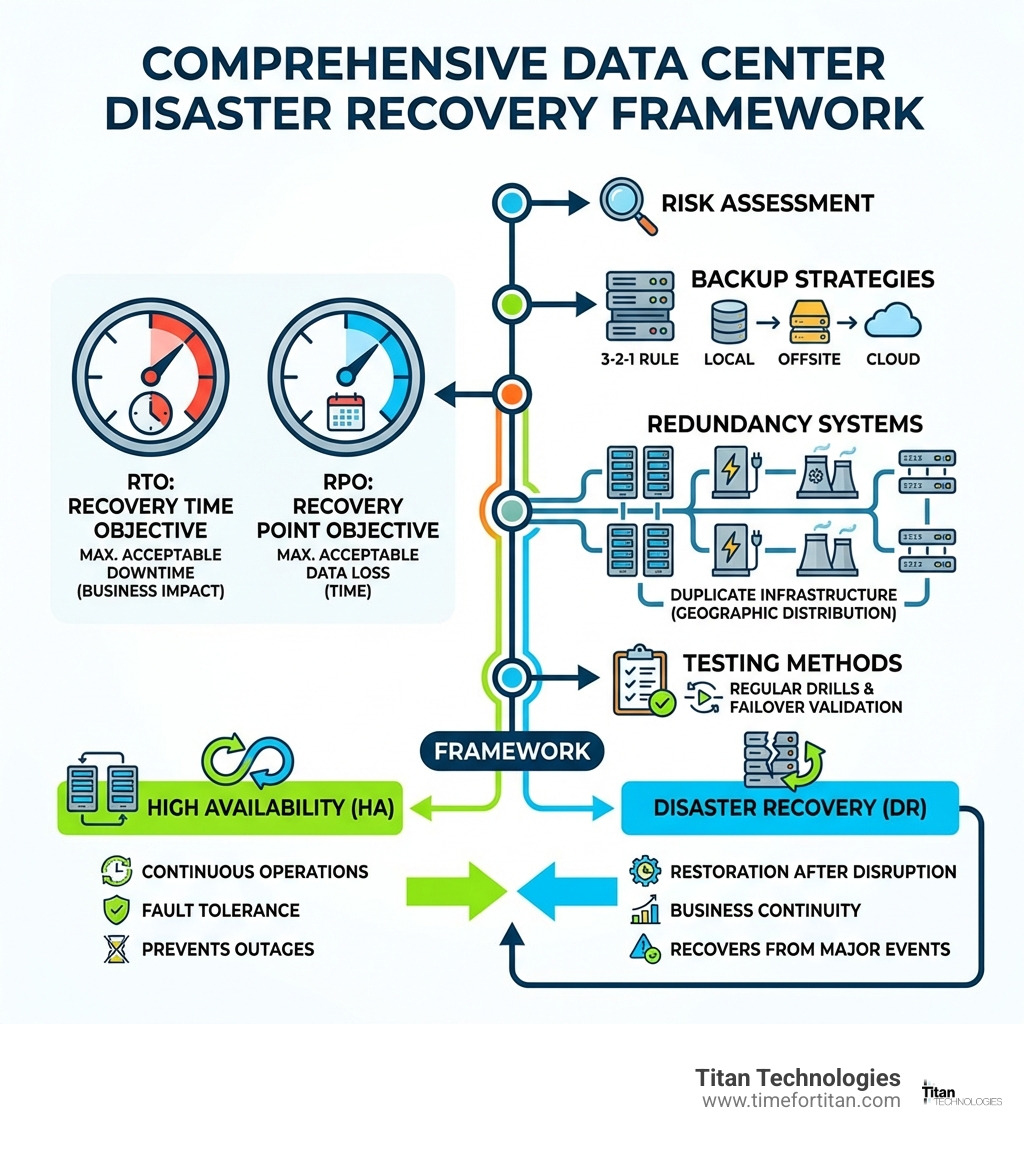
Key Components of Data Center Disaster Recovery:
- Recovery Time Objective (RTO): Maximum acceptable downtime before business impact becomes severe
- Recovery Point Objective (RPO): Maximum acceptable data loss measured in time
- Backup Strategy: Multiple copies of data stored across different locations (3-2-1 rule)
- Redundant Infrastructure: Duplicate power, cooling, network, and hardware systems
- Testing Protocol: Regular validation that recovery procedures actually work when needed
- Geographic Distribution: Secondary sites far enough away to avoid simultaneous impact
The stakes are incredibly high. Research shows that 95% of enterprises face costly IT outages, with downtime costing up to $400,000 per hour for typical businesses—and up to $5 million per hour for large enterprises. Ransomware attacks alone cause an average of over 16 days of downtime, while 58% of large UK businesses experienced cybercrime in the last year. Even more sobering: 93% of companies that lost their data center for 10 days or more filed for bankruptcy within one year.
Yet many small and medium-sized businesses in Central New Jersey still operate without a comprehensive disaster recovery plan. They assume their basic backups are enough, or that disasters “won’t happen to us.” This thinking leaves them vulnerable to catastrophic losses that could end their business overnight.
I’m Paul Nebb, founder of Titan Technologies, and I’ve spent nearly two decades helping businesses across Central New Jersey protect their operations through robust data center disaster recovery strategies. My work includes certifications in emergency preparedness and speaking engagements at venues from West Point to Microsoft on cybersecurity and business continuity.
Glossary for data center disaster recovery:
Defining Data Center Disaster Recovery and Its Business Impact
When we talk about data center disaster recovery, we aren’t just talking about keeping the lights on. We are talking about the survival of your brand. In cities like Newark, NJ, or Princeton, NJ, where the business pace is relentless, a single hour of disconnected servers can lead to a tailspin of lost revenue and broken trust.

The foundation of any resilient strategy is a thorough Risk Assessment. We look at everything from the likelihood of a localized flood in Trenton to the statistical probability of a human error in your server room. Did you know that human error accounts for around two-thirds of all data center outages? It’s not always a hurricane; sometimes it’s just a tired technician hitting the wrong switch.
To make this practical, we perform a Business Impact Analysis (BIA). This process identifies which functions are mission-critical. If your data center goes dark, does your payroll stop? Does your customer-facing app crash? By quantifying these risks in financial terms, we move the conversation from “IT jargon” to “business reality.” According to recent studies, 95% of enterprises face costly IT outages, and many don’t realize that 51% of that downtime is entirely avoidable with proper planning.
For local businesses, implementing a Business Disaster Recovery (BDR) solution means having a roadmap that ensures your critical technology is available within 24 hours or less—no matter what the world throws at you.
The Role of RTO and RPO in Data Center Disaster Recovery
Think of RTO and RPO as the “speedometer” and “odometer” of your recovery plan.
- Recovery Time Objective (RTO): This is the maximum acceptable length of time your application can be offline. If your RTO is four hours, your team must be able to restore service within that window or face severe consequences.
- Recovery Point Objective (RPO): This measures data loss. It is the maximum acceptable length of time during which data might be lost due to an incident. If you back up your data every 24 hours, your RPO is 24 hours. If your servers crash at hour 23, you’ve lost a whole day of work.
These metrics aren’t just numbers; they roll up into your Service Level Agreements (SLA). In competitive markets like New Brunswick and Woodbridge, meeting your recovery goals is a key measurable element of maintaining business integrity.
Quantifying the Cost of Unexpected Downtime
The financial impact of a disaster is often much higher than most business owners realize. Beyond the immediate loss of sales, there is the grueling reality of ransomware. Cybersecurity threats have increased by more than 40% in the last two years, and these attacks cause an average of over 16 days of downtime.
Can your business survive 16 days of zero productivity? For many, the answer is a resounding no. With downtime costing a minimum of $400,000 per hour for enterprise-level operations, the total loss can easily climb into the millions. Then there is the “intangible” damage: reputation. Once customers lose trust in your ability to keep their data safe and accessible, they rarely come back.
High Availability vs. Disaster Recovery: Key Differences
We often hear clients in Edison or Matawan use the terms “High Availability” and “Disaster Recovery” interchangeably. However, they serve very different purposes.
| Feature | High Availability (HA) | Disaster Recovery (DR) |
|---|---|---|
| Primary Goal | Continuous operation / Minimize downtime | Restoration of service after a major event |
| Scope | Component failure (e.g., a single server) | Site failure (e.g., entire data center) |
| Focus | Uptime and performance | Data integrity and business continuity |
| Mechanism | Redundant hardware, load balancers | Off-site backups, secondary sites |
High availability (HA) is about keeping things running smoothly during minor hiccups. It ensures an agreed level of operational performance. Data center disaster recovery, on the other hand, is your “break glass in case of emergency” plan. You need HA to stay efficient day-to-day, but you need DR to ensure you still have a business to run if your primary facility is leveled by a fire or a massive cyberattack.
Building Resilience Through Geographically Dispersed Data Centers
A common mistake is keeping your “secondary” site too close to your primary one. If both sites are in the same town in New Jersey, a single regional power outage or hurricane could take out both.
The industry “gold standard” is the 100-mile rule. By having data centers geographically separated by at least 100 miles, you ensure that a single natural disaster is unlikely to impact both simultaneously. This is where Cloud Hosting New Jersey becomes a game-changer. By leveraging geographically diverse cloud resources, you can maintain low latency for your daily operations while having the peace of mind that your data is safe in a different region.
Infrastructure Redundancy and Failover Systems
True resilience goes beyond just data. You need redundancy in your physical infrastructure:
- Power & Cooling: Dual power feeds and backup generators are non-negotiable.
- Network Connections: Multiple ISP paths ensure that if one fiber line is cut, your business stays online.
- Hardware Redundancy: Utilizing virtualization and workload management allows for automatic failover to healthy hardware if a specific server fails.
Implementing Cloud Backup Services NJ allows you to offload the burden of physical hardware management while gaining the benefits of enterprise-grade failover systems.
Core Components of a Data Center Disaster Recovery Strategy
To build a strategy that actually works, we follow the 3-2-1 Rule. This is the bedrock of any successful data center disaster recovery plan.
- 3 Copies of Data: Keep your original data and at least two backups.
- 2 Different Media: Use different storage types (e.g., local disk and cloud).
- 1 Offsite Copy: Always keep one copy in a completely different geographic location.
We also categorize backups into three types:
- Full Backups: A complete copy of all data. It’s the most comprehensive but also the most time-consuming.
- Incremental Backups: Only copies the data that has changed since the last backup. This is fast and saves space.
- Differential Backups: Copies all data that has changed since the last full backup.
Choosing the right mix of Backup and DR Solutions depends on your specific RTO and RPO requirements.
Cold, Warm, and Hot: Choosing Your Data Center Disaster Recovery Pattern
How fast do you need to be back up? Your answer will determine which “pattern” you choose.
- Cold Site: This is the most cost-effective but slowest. It’s essentially a shell with power and cooling, but no data or hardware ready to go. Recovery can take days.
- Warm Site (Pilot Light): Hardware is present and data is frequently mirrored, but the site isn’t “live.” It’s like having a car with the engine off—you just need to turn the key.
- Hot Site (Active-Active): This is the peak of resilience. Your data is replicated in real-time, and both sites are fully operational. If one fails, the other takes over instantly with zero downtime.
For many businesses in Elizabeth or Lakewood, a “Warm” strategy provides the best balance of cost and recovery speed. You can see how this looks in practice by reviewing a Disaster Recovery Plan Example.
Modernizing Resilience with Cloud and DRaaS
Traditional DIY disaster recovery is often too expensive and complex for mid-sized businesses. That’s where Disaster Recovery as a Service (DRaaS) comes in. DRaaS allows you to leverage the provider’s infrastructure, eliminating the need for you to build and staff a second data center.
By moving to a Cloud-based Disaster Recovery Plan, you gain scalability and automation. Tools like AWS DR Solutions allow for “Infrastructure as Code,” meaning your entire recovery environment can be spun up automatically with a single script.
Security, Compliance, and Testing Protocols
Data center disaster recovery is inseparable from cybersecurity. A disaster isn’t always a fire; often, it’s a ransomware actor who has encrypted your entire database.
With cybersecurity threats having increased by 40%, your DR plan must include “immutable” backups—copies of data that cannot be changed or deleted even by an admin. This is critical for meeting compliance standards like HIPAA for healthcare providers in Newark or PCI-DSS for retailers in Freehold. Integrating Cloud Computing and Disaster Recovery ensures that your security controls are mirrored across both your production and recovery environments.
Testing Methods for a Data Center Disaster Recovery Plan
A plan that hasn’t been tested is just a wish. We recommend at least four types of tests:
- Checklist Tests: A simple review of the plan by all stakeholders.
- Parallel Testing: Running recovery systems alongside production to ensure they can handle the load.
- Simulation: A “fire drill” where the team responds to a hypothetical disaster scenario.
- Full Interruption: The most rigorous test where you actually shut down production and failover to the DR site.
To make these tests more reliable, we use infrastructure as code (IaC). This ensures that the recovery environment is identical to the production environment every single time, eliminating the “it worked in the test but failed in reality” syndrome.
Monitoring and Incident Response
You can’t recover from what you don’t detect. Robust monitoring using Data Center Infrastructure Management (DCIM) software is essential. We set real-time alerts for environmental thresholds (like heat or humidity) and system health maps.
Unfortunately, many organizations face a cloud and cybersecurity skills gap. This is why partnering with a local expert is so valuable. We provide the 24/7 monitoring and forensic analysis that small teams simply can’t manage on their own.
Frequently Asked Questions about Data Center Resilience
What is the difference between High Availability and Disaster Recovery?
High Availability (HA) focuses on keeping systems running during minor, localized failures (like a single server crashing). Disaster Recovery (DR) is a broader strategy designed to restore operations after a catastrophic event that takes out an entire facility or region. You need HA for daily uptime and DR for long-term survival.
How does the 3-2-1 backup rule apply to data centers?
In a data center context, the 3-2-1 rule means keeping three copies of your mission-critical data. Two of these should be on different storage media (such as a local SAN and an on-site backup appliance), and at least one copy must be stored in a geographically distant location (like a secondary data center or the cloud) to protect against regional disasters.
Why is a Business Impact Analysis (BIA) necessary for DR planning?
A BIA is the “brain” of your DR plan. It helps you identify which business processes are most critical and calculates the financial cost of their downtime. Without a BIA, you might spend too much money protecting non-essential systems while leaving your most vital operations vulnerable.
Conclusion
At Titan Technologies, we believe that every business in Central New Jersey—from the law firms in Princeton to the manufacturers in Matawan—deserves enterprise-grade protection. Our professional team offers fast, reliable support with a 100% satisfaction guarantee, ensuring your network is managed efficiently and your data is secured against the unthinkable.
Don’t wait for a “16-day downtime” event to realize your backups weren’t enough. Let us help you build a resilient future.
Ready to secure your business? Explore our Business Disaster Recovery (BDR) Solutions and let’s start building your lifeline today.