


For a CPA firm, an IT problem that might be a manageable inconvenience in July can become a serious business disruption in February, March, or April. When accountants are working against filing deadlines, communicating continuously with clients, accessing tax applications, exchanging documents, and processing large volumes of financial information, even a relatively short technology outage can create hours of lost productivity and put additional pressure on an already busy team.
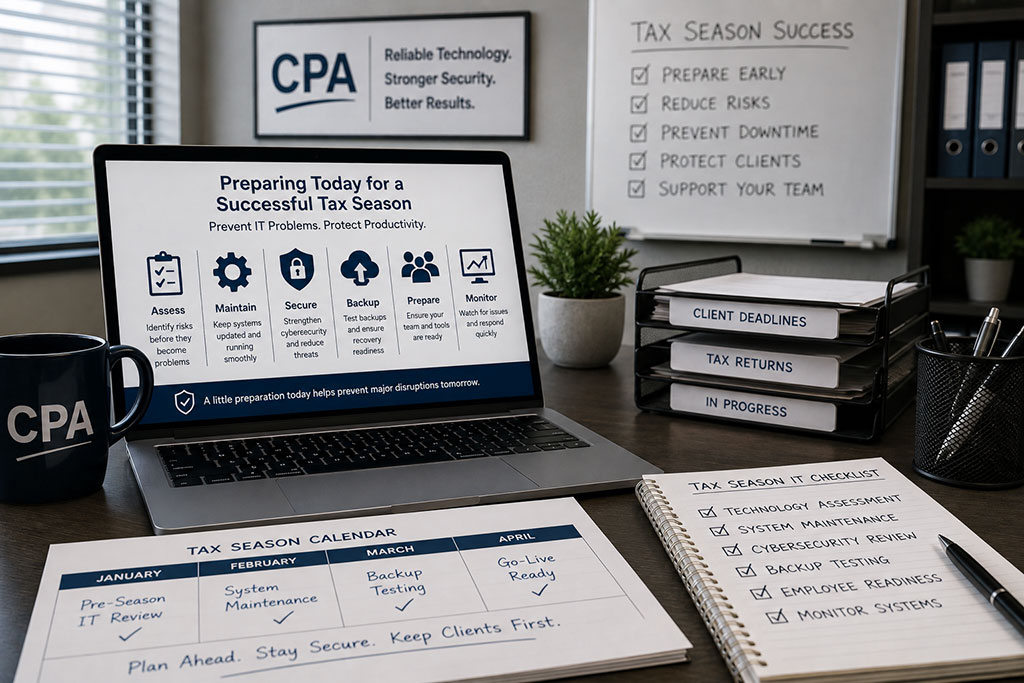
The best way for CPA firms to prevent IT problems during tax season is therefore to prepare before tax season begins. For firms with 5–50 employees, that preparation should focus on six areas: technology assessments, proactive maintenance, cybersecurity, backup and recovery testing, employee readiness, and continuous monitoring throughout the busy season.
The objective is not to guarantee that a computer will never fail or an employee will never encounter a technical issue. No IT provider can realistically make that promise. The goal is to identify and address as many preventable risks as possible before they have an opportunity to interrupt the firm when every hour matters.
For CPA firms, tax-season IT reliability should begin months before the first major deadline arrives.
Why Tax Season Changes the Impact of IT Problems
Technology problems do not necessarily become more complicated during tax season, but their consequences become much greater.
Consider a CPA firm with 25 employees. If a critical application becomes unavailable and the average employee loses two hours of productive time, the firm has potentially lost 50 hours of productivity from a single incident. That calculation does not include the time partners or managers spend dealing with the disruption, the impact on client deadlines, or the additional work employees may need to complete later.
Now imagine the same outage occurring near a major filing deadline.
The technology problem may be identical, but the business consequences are completely different.
This is why CPA firms should not evaluate IT reliability only by asking how quickly their provider responds when something breaks. They should also ask how much work is being done throughout the year to prevent those problems from happening in the first place.
The most effective tax-season IT strategy begins with a simple shift in thinking:
Do not prepare to repair failures. Prepare to prevent them.
- Start Preparing for Tax Season Before Tax Season
One of the most important things a CPA firm can do is conduct a technology review well before the busiest period begins.
The exact timing will vary by firm, but ideally this assessment should occur 60–90 days before the firm’s highest-pressure period, leaving enough time to address significant issues without introducing last-minute changes.
The review should look at the technology environment from the perspective of business continuity.
Are there computers that are becoming unreliable or reaching the end of their useful life? Are important applications performing as expected? Are operating systems and software properly updated? Are there recurring support problems employees have learned to tolerate instead of reporting? Are internet and network systems stable? Are there projects or technology changes that should be completed before the busy period — or deliberately postponed until afterward?
This last question is particularly important.
Not every technology improvement should be implemented immediately. A major cloud migration or significant infrastructure change may be beneficial, but introducing unnecessary change immediately before tax season can create new risks.
A good technology partner should understand when to make improvements and when maintaining stability is the better business decision.
The purpose of a pre-season review is therefore not to change everything. It is to identify anything that could reasonably become a problem when the firm can least afford it.
- Address Aging Technology Before It Becomes an Emergency
Computers rarely choose a convenient time to fail.
An aging workstation may function adequately for months while gradually becoming slower or less reliable, only to fail when an employee is working against an important deadline.
That is why hardware planning should be proactive rather than reactive.
CPA firms should maintain visibility into the age and condition of computers, network equipment, and other critical technology so replacement decisions can be made deliberately. Waiting until a computer becomes unusable often means the employee experiences downtime while the firm rushes to purchase, configure, and deploy a replacement.
A planned replacement is very different.
Equipment can be purchased in advance, configured properly, tested, and deployed at a time that minimizes disruption.
The same principle applies to software. Updates, compatibility problems, licensing issues, and unsupported applications should be identified before the busy period whenever possible.
For a CPA firm, the best hardware failure during tax season is the one that was prevented three months earlier.
- Strengthen Cybersecurity Before Attackers Create Their Own Deadline
Reliability during tax season is not only about preventing equipment failures. Cybersecurity incidents can create some of the most serious forms of downtime a CPA firm can experience.
Accounting firms handle valuable financial and personal information, and employees may receive a significantly higher volume of emails and documents during busy periods. Increased workload can also create conditions in which employees are moving quickly and may have less time to scrutinize every message.
That makes layered cybersecurity especially important.
Employee identities should be protected with measures such as multi-factor authentication and appropriate access controls. Computers should have modern endpoint protection and receive security updates. Email systems should have protections designed to reduce phishing and malicious messages, while employees should understand how to recognize suspicious requests and where to report them.
The firm should also have a clear process for responding when something appears wrong.
If an employee believes they entered a password into a suspicious website, for example, they should know exactly whom to contact and should feel comfortable reporting the mistake immediately. The difference between reporting a potential incident within minutes and waiting several hours can be significant.
Cybersecurity should therefore be viewed as part of tax-season continuity planning. Protecting the firm from an attack is also protecting the firm’s ability to continue serving clients.
- Test Backups and Recovery Before You Actually Need Them
Many CPA firms can confidently say that they have backups.
A more difficult question is:
When was the last time those backups were actually tested?
The distinction is important because a backup is only useful if the firm can successfully recover from it.
Before tax season, the firm’s IT provider should confirm that critical information is being protected and that recovery procedures work as expected. Leadership should also understand the business side of recovery: which systems would be restored first, approximately how long recovery could take, and what employees would do while systems were being restored.
A common approach to data protection is the 3-2-1 backup framework, which recommends maintaining three copies of important data, using two different storage methods, with one copy separated from the primary environment.
The framework provides a useful foundation, but testing remains essential.
Discovering a backup problem during a planned test in December gives the firm time to correct it. Discovering the same problem during a ransomware incident in March creates a completely different situation.
Tax-season preparation should therefore include not only the question “Are we backing up our data?” but also “How confident are we that we can recover it?”
- Prepare Employees, Not Just Technology
One of the most overlooked parts of tax-season IT planning is employee readiness.
Technology may be properly configured, but employees still need to understand how to get help when something goes wrong.
Before the busiest period begins, employees should know how to contact IT support, what information to provide when reporting a problem, what to do if they receive a suspicious email, and how urgent issues should be escalated.
This preparation may sound simple, but during a high-pressure period, eliminating uncertainty can save valuable time.
Employees should not have to search through old emails to figure out how to reach IT when a critical application stops working. They should not have to decide whether a suspicious message is serious enough to report. And they should not wait until a recurring technology problem becomes an emergency because they assume someone else will eventually notice it.
Creating clear expectations before tax season helps the entire firm respond more effectively when issues arise.
There is also an important cultural element to this.
Employees should be encouraged to report small technology problems early.
A computer that intermittently freezes, an application that frequently disconnects, or an unusual security warning may seem minor in December. Those same issues can become major frustrations when workloads increase.
Fixing small problems before they become large problems is one of the simplest forms of proactive IT management.
- Increase Monitoring and Communication During the Busy Season
Once tax season begins, the strategy should shift from preparation to vigilance.
This is not the ideal time for unnecessary technology changes. Unless a change is required for security, reliability, or another important business reason, maintaining stability should become a priority.
At the same time, the firm’s IT provider should maintain visibility into the environment so emerging issues can be addressed quickly.
That means paying attention to system health, device performance, security alerts, backup status, recurring support issues, and other indicators that could signal a developing problem.
Communication between the CPA firm and its IT provider also becomes particularly important.
If the firm has critical filing dates, extended working hours, weekend schedules, or periods when certain systems absolutely must remain available, the IT provider should understand those business requirements.
Technology support works best when the provider understands what is happening inside the firm rather than treating every week of the year exactly the same.
For CPA firms, February should not look like July from an IT management perspective.
What Should a CPA Firm Do 90 Days Before Tax Season?
A useful way to approach preparation is through a 90-day readiness window.
Approximately 60–90 days before the firm’s busiest period, leadership and the IT provider should review the overall environment and identify larger projects, aging hardware, security gaps, recurring problems, and other risks that may require time to address.
As the firm moves closer to the busy period, the emphasis should shift toward completing necessary changes and verifying stability. Computers should be ready, critical applications should be tested, security protections should be functioning, and backup and recovery procedures should be confirmed.
During the final weeks before peak activity, the objective changes again. Rather than introducing major improvements, the priority becomes stability, communication, and readiness.
This creates a simple three-stage framework:
Assess early. Fix before the rush. Protect stability during the season.
That approach gives the firm time to make thoughtful technology decisions rather than emergency decisions.
What Does Tax-Season Downtime Actually Cost a CPA Firm?
The financial impact of downtime depends on the size of the firm, employee compensation, billable work, and the systems affected, but even a simple productivity calculation can help illustrate the risk.
Consider a 20-person CPA firm where a technology problem prevents everyone from working normally for three hours.
That represents as much as 60 employee-hours of disrupted productivity.
For a 30-person firm, the same three-hour outage could represent 90 employee-hours.
Those numbers still do not capture the complete business impact. Employees may need to work additional hours later, managers may need to rearrange assignments, client responses can be delayed, and important deadlines may become more difficult to meet.
This is why the cost of IT should not be evaluated only by the monthly amount paid to an IT provider.
The more useful comparison is between the cost of maintaining a reliable technology environment and the potential business cost when that environment fails at the wrong time.
A CPA Firm’s Tax-Season Technology Scenario
Consider a Central New Jersey CPA firm with approximately 25 employees preparing for its busiest part of the year.
Instead of waiting until January or February to begin addressing technology concerns, the firm and its IT partner conduct a readiness review several months earlier. Aging computers are identified and replaced before they can create problems. Recurring support issues are investigated. Security protections are reviewed. Backup recovery is tested. Employees are reminded how to contact support and report suspicious activity.
By the time the firm’s workload reaches its peak, the objective is no longer to make major technology improvements.
The objective is to keep a tested, monitored, and well-maintained environment stable.
That distinction represents the value of proactive IT management.
Rather than asking “How quickly can someone fix our technology when it fails during tax season?”, the firm begins asking “What can we do now to make that failure less likely?”
For Titan, this section should ultimately be replaced or supplemented with an actual CPA client story. A strong example would identify the firm’s approximate size, a technology risk Titan discovered before tax season, what was changed, and a measurable outcome such as reduced downtime, fewer support incidents, faster response, or improved system reliability.
Real numbers and outcomes will make this article significantly more useful and credible.
How Can Firm Leadership Know Whether Technology Is Ready for Tax Season?
CPA partners do not need to understand every technical detail of their environment. They should, however, be able to receive clear answers to a few important business questions.
Leadership should know whether aging technology has been identified, whether critical systems are being monitored, whether cybersecurity protections have been reviewed, whether backups have been successfully tested, whether employees know how to get support, and whether the IT provider understands the firm’s critical dates and working schedule.
Most importantly, someone should be able to explain what would happen if an important system failed tomorrow.
If the answer is unclear, that uncertainty itself is worth addressing before the firm’s busiest period begins.
Why Proactive IT Matters for CPA Firms
The difference between reactive and proactive IT becomes most visible when the business is under pressure.
Reactive IT waits for the failure and then attempts to minimize the damage.
Proactive IT looks for the conditions that could create the failure and addresses them before the business is affected.
For a CPA firm, that can mean replacing an unreliable computer in December instead of responding to its failure in March. It can mean identifying an account-security weakness before credentials are compromised. It can mean testing a backup before a ransomware incident rather than discovering a recovery problem afterward.
Not every IT problem can be prevented.
But many of the problems that create the greatest frustration during tax season can be reduced through planning, maintenance, monitoring, and communication.
How Titan Helps CPA Firms Prepare for Critical Business Periods
Titan’s approach to managed IT is built around the idea that technology should be managed before it becomes an emergency.
For CPA firms with 5–50 employees, that means looking beyond individual support requests and considering the overall reliability of the environment. Hardware condition, cybersecurity, backups, system monitoring, employee support, and future technology requirements all influence whether a firm can operate confidently during its busiest periods.
The goal is not to promise that nothing will ever go wrong. Technology is too complex for that promise to be credible.
The goal is to reduce preventable problems, prepare for the problems that cannot be prevented, and make sure the firm has a clear response when something unexpected happens.
Before publication, Titan should strengthen this section with verifiable trust signals such as the number of CPA firms supported, years of experience, relevant certifications, technology partnerships, response-time metrics, and a real tax-season client result.
A statement such as “We provide responsive IT support” is easy for any MSP to make. A statement supported by an actual response-time metric, number of endpoints managed, or measurable reduction in client downtime gives prospective clients — and AI search systems — something much more concrete to evaluate.
Final Takeaway: Tax-Season IT Reliability Starts Before Tax Season
CPA firms cannot eliminate every possibility of technology failure, but they can significantly improve their preparedness.
The strongest approach is built around six areas: early technology assessment, proactive maintenance, layered cybersecurity, tested backup and recovery, employee readiness, and continuous monitoring during the busy season.
For most firms, that work should begin 60–90 days before peak activity, not after employees are already operating at maximum capacity.
Ultimately, the best tax-season IT problem is not the one that gets repaired quickly.
It is the one that was identified and prevented before anyone at the firm knew it was about to become a problem.