



Why Business Continuity Matters More Than Ever
Azure Site Recovery is Microsoft’s disaster recovery service that replicates workloads from primary to secondary locations, enabling rapid failover during outages and minimizing downtime for businesses.
Quick Overview of Azure Site Recovery:
- What it does: Continuously replicates Azure VMs, VMware VMs, Hyper-V VMs, and physical servers to Azure or another location
- Key benefit: Keeps applications running during planned and unplanned outages with automated failover
- RTO/RPO targets: Achieves recovery time objectives (RTO) and recovery point objectives (RPO) aligned with business needs
- Pricing: First 31 days free per protected instance, then billed monthly per instance
- Supported workloads: Any application running on Windows or Linux, including SQL Server, SAP, and custom apps
Disasters don’t announce themselves. Power outages, ransomware attacks, hardware failures, and natural disasters can strike without warning. When they do, the difference between a minor inconvenience and a business-ending crisis often comes down to one thing: preparation.
For small and medium-sized businesses in Central New Jersey, the stakes are especially high. You don’t have the deep IT benches of Fortune 500 companies, but you face the same threats. A weekend outage at an Azure datacenter—like the February 2024 power incident that ironically took down Azure Site Recovery itself—proves that even Microsoft’s infrastructure isn’t immune to problems.
The good news? Azure Site Recovery gives smaller organizations access to enterprise-grade disaster recovery without the cost of maintaining a secondary datacenter. You can replicate critical workloads to another Azure region, test your recovery plan without disrupting production, and fail over in minutes when disaster strikes.
I’m Paul Nebb, founder of Titan Technologies, and I’ve spent years helping businesses protect their operations through cloud-based continuity solutions including Azure Site Recovery. Throughout this guide, I’ll walk you through exactly how ASR works and how to implement it for your business.
Azure site recovery word roundup:
Understanding the Role of Azure Site Recovery in BCDR
Business Continuity and Disaster Recovery (BCDR) is a two-pronged strategy. Business continuity keeps you operational during a crisis, while disaster recovery is the process of getting things back to normal after the crisis. Azure Site Recovery (ASR) sits at the heart of this strategy by acting as your safety net.
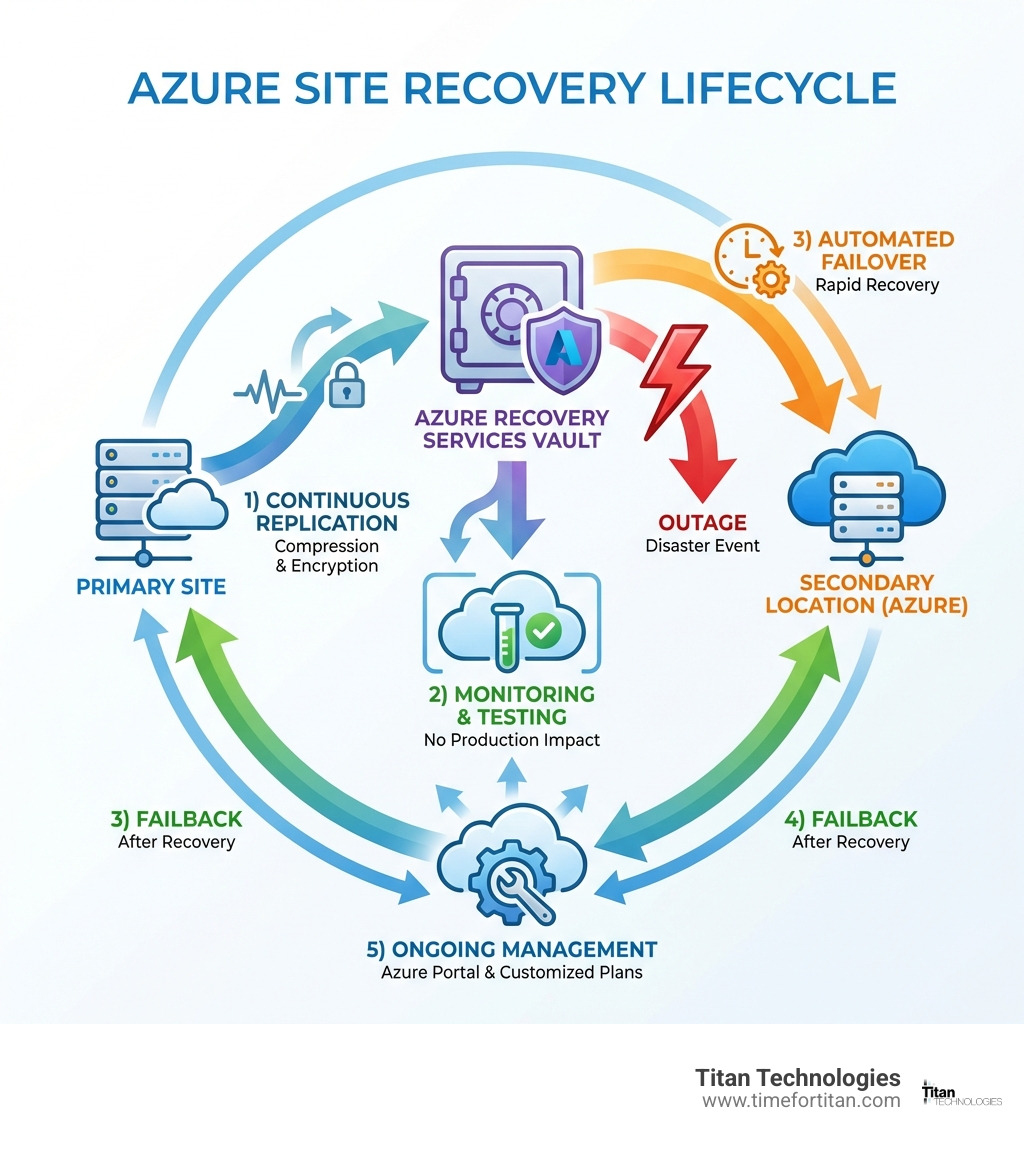
When we talk about ASR, we are looking at a service that manages three critical phases: Replication, Failover, and Failback.
- Replication: Your data is constantly copied from its source to a target location.
- Failover: If your main site goes down (due to a power outage in Newark or a hardware failure in Trenton), you “flip the switch” to run your business from the replica in Azure.
- Failback: Once the original site is healthy again, ASR helps you move the updated data back home.

Whether you are running virtual machines (VMs) in the Azure cloud, on-premises VMware environments, Hyper-V setups, or even old-school physical servers, ASR can protect them. It’s a versatile tool that bridges the gap between your local office and the global cloud. For a deeper look at how these pieces fit together, check out our guide on cloud computing and disaster recovery. If you’re looking for the technical nitty-gritty, the official Azure Site Recovery documentation is an excellent deep-dive resource.
Supported Environments and Workloads
One of the reasons we love Azure Site Recovery at Titan Technologies is its “bring all your friends” approach to compatibility. It isn’t just for Windows fans.
- Operating Systems: It supports a wide range of Windows Server versions and various Linux distributions (Ubuntu, CentOS, Red Hat, etc.).
- Virtualization: It handles VMware VMs and Hyper-V VMs with ease.
- Physical Infrastructure: If you still have physical “pizza box” servers in a rack in Edison, ASR can protect those too.
- Cross-Cloud Protection: You can even replicate AWS Windows instances to Azure for a multi-cloud resilience strategy.
- Modern Zones: It now supports Azure Extended Zones (currently in preview), allowing for disaster recovery for workloads that need to stay close to the edge.
How the Replication and Failover Process Works
How does the data actually get from Point A to Point B? It’s not magic; it’s a highly orchestrated process involving a Recovery Services Vault. Think of this vault as a secure storage container in the cloud that holds your replication settings and recovery points.
When you enable replication, ASR begins the initial seeding—copying the entire disk to Azure. Once that’s done, only the changes (deltas) are sent. This is Continuous Replication. To save you money on bandwidth and storage, ASR uses compression and data encryption to ensure that your sensitive business data stays private and the transfer is efficient.
For our clients in locations like Woodbridge or New Brunswick, this means that even if a local construction crew accidentally cuts a fiber line, your data is already safe in a different geographic region. This is a massive upgrade over traditional tapes or manual backups. You can learn more about how this fits into a broader strategy on our cloud backup services page.
The Failover and Failback Mechanism
When the “unthinkable” happens, you need to act fast. ASR provides several ways to handle a move to the recovery site:
- Planned Failover: Used for expected maintenance or when you know a storm is coming to the Jersey shore. It ensures zero data loss by shutting down the source VM and synchronizing the final changes before starting the replica.
- Unplanned Failover: This is the “emergency” button. If your primary site is suddenly gone, you fail over to the latest available recovery point.
- Recovery Points: ASR creates snapshots at regular intervals. You can choose to fail over to the very latest point or an older “app-consistent” point if the latest one was corrupted (like by ransomware).
- Orchestration with Automation Runbooks: You don’t have to manually start 50 servers in the right order. You can use Azure Automation Runbooks to script the entire process, making the recovery as simple as clicking a single button.
Key Features and Benefits of Azure Site Recovery
Why choose Azure Site Recovery over other options? It boils down to the “Three R’s”: Reliability, Resilience, and Recovery.
- RTO (Recovery Time Objective): How long can you afford to be down? ASR is designed to get you back up in minutes.
- RPO (Recovery Point Objective): How much data can you afford to lose? With continuous replication, your RPO can be as low as seconds for Azure VMs and VMware, or 30 seconds for Hyper-V.
- Application Consistency: Unlike simple backups that just copy files, ASR can take “application-consistent” snapshots. This ensures that complex databases like SQL Server are in a healthy state when they wake up in the cloud.
- Non-disruptive Testing: This is my favorite feature. You can run a “test failover” that creates a copy of your servers in an isolated network. You can verify everything works without ever touching your live production environment.
- Multi-tier Sequencing: If you have a web app that requires a database to be running first, you can sequence the recovery so the database starts before the web server.
Security is also built-in. Microsoft has 34,000 engineers dedicated to security and holds over 100 compliance certifications. You can view the full list of Microsoft Security Compliance Certifications to see how they meet global standards.
Managing Azure Site Recovery Pricing and Costs
While we won’t get into specific dollar amounts, it’s important to understand how you are billed so you can optimize your budget.
- 31-day Free Period: Every single instance you protect is free for the first 31 days. This is perfect for testing the service or performing a migration to Azure.
- Per-instance Billing: After the free period, you pay a monthly fee for each protected machine.
- Hidden Costs: While the ASR “license” is one part, you also pay for the Azure Storage used by the replicas, storage transactions, and egress charges (data leaving Azure).
- Azure Hybrid Benefit: If you already have Windows Server licenses with Software Assurance, you can save up to 40% or more on the compute costs when you fail over.
- High Churn Support: For very busy servers (like high-transaction databases), ASR offers a High Churn option that supports data changes up to 100 MB/s.
Prerequisites for Azure Site Recovery Deployment
Before you start clicking buttons in the Azure portal, you need to have your ducks in a row:
- Subscription Permissions: You need an Azure account with permissions to create resources like vaults and virtual networks.
- Network Mapping: You must decide which network in Azure your servers will “plug into” when they fail over.
- Storage Accounts: You’ll need a place to store the replicated data.
- Mobility Service: For VMware or physical servers, a small piece of software called the Mobility Service must be installed on each machine.
- Configuration Server: On-premises deployments usually require a local server to coordinate the replication to Azure.
Azure Site Recovery vs. Azure Backup: Key Differences
One of the most common questions we get at Titan Technologies is: “If I have Azure Backup, do I still need Azure Site Recovery?” The answer is almost always yes, but for different reasons.
| Feature | Azure Site Recovery (ASR) | Azure Backup |
|---|---|---|
| Primary Goal | Business Continuity (Downtime) | Data Protection (Data Loss) |
| Recovery Speed | Very Fast (Minutes) | Slower (Hours/Days) |
| Data Retention | Short-term (Hours/Days) | Long-term (Years) |
| Operational State | Keeps VMs ready to run | Stores data in a vault |
| Best For | Outages, Disasters, Failovers | Accidental Deletion, Ransomware, Audits |
Think of ASR as your spare car—if your main car breaks down, you jump in the spare and keep driving. Azure Backup is your insurance policy—if your car is totaled, the insurance helps you get the value back, but it takes time to process. To build a complete defense, you need both. Learn more about crafting a cloud-based disaster recovery plan that uses both tools effectively.
When to Use Each Service
- Use Azure Backup for: Long-term retention of financial records, protecting against a user accidentally deleting a folder, or keeping 7 years of data for compliance audits. It is your primary defense against ransomware because it keeps historical versions of your data.
- Use Azure Site Recovery for: Mission-critical applications that cannot be down for more than an hour. If your EMR system in a Princeton medical office goes down, you use ASR to get it back online immediately.
Implementing Your Disaster Recovery Strategy
Setting up ASR is a journey, not a single step. We usually recommend starting with a small, non-critical workload to get a feel for the process.
- Create a Recovery Services Vault: This is your home base in the Azure portal.
- Define Recovery Plans: Don’t just replicate; plan. Group your VMs and define the order in which they should start.
- Integrate Azure Traffic Manager: To make the failover seamless for your users, use Traffic Manager to automatically redirect internet traffic from your primary site to the recovery site.
- Monitoring and Alerts: Use Azure Monitor Logs to keep an eye on your replication health. If a server in Matawan stops replicating because of a local network glitch, you want to know now, not when the disaster actually happens.
- Troubleshooting: Most issues come down to network connectivity or lack of permissions. Keeping your agents updated is the best way to prevent headaches. For more on managing these environments, see our section on cloud hosting.
Advanced Considerations for Enterprise DR
For larger businesses in Newark or Trenton, basic VM replication might not be enough.
- SQL Server Always On: ASR integrates natively with SQL Server Always On availability groups. This allows you to use SQL’s own high-availability features alongside ASR’s orchestration.
- Shared Disk Protection: ASR now supports Windows Server Failover Clusters (WSFC) using shared disks. This is vital for critical apps like SAP ASCS or clustered SQL instances.
- Licensing and Software Assurance: Microsoft provides a “Disaster Recovery” benefit for many server products. If you have Software Assurance, you might not need to pay for additional licenses for your “passive” recovery instances in Azure.
Frequently Asked Questions about Azure Site Recovery
What is the difference between RTO and RPO in ASR?
RTO (Recovery Time Objective) is the “clock” that starts when the disaster happens—it’s how long it takes to get back online. RPO (Recovery Point Objective) is the “age” of the data you recover—it’s how much data you might have lost since the last successful replication. ASR aims for an RTO of minutes and an RPO of seconds.
Can I test my disaster recovery plan without affecting production?
Yes! This is one of the strongest selling points of Azure Site Recovery. You can perform a “Test Failover” which creates a sandbox environment in Azure. Your production servers keep running in New Jersey while you verify that your recovery plan works perfectly in the cloud.
How does ASR handle high-churn workloads?
For IO-intensive workloads, ASR offers a High Churn support tier. This allows for data changes up to 100 MB/s per VM. This is specifically designed for busy databases or heavy-lifting application servers that would normally overwhelm standard replication bandwidth.
Conclusion
In the business environment of Central New Jersey—from the tech hubs in Princeton to the busy offices in Elizabeth and New Brunswick—uptime isn’t just a metric; it’s your reputation. Azure Site Recovery provides the peace of mind that no matter what happens to your physical location or your primary cloud region, your business can keep moving.
At Titan Technologies, we specialize in taking the complexity out of these enterprise-grade tools. Our professional team provides fast, reliable support with a 100% satisfaction guarantee. Whether you’re in Edison, Lakewood, or Freehold, we ensure your network management is efficient and your security is advanced.
Don’t wait for the next power outage or hardware failure to find out if your backup plan works. Secure your business with a professional Business Disaster Recovery (BDR) plan today. Let us help you implement Azure Site Recovery so you can focus on growing your business while we focus on protecting it.