




Why Effective Network Management is Critical for Business Success
Network management and administration is the set of processes, tools, and skills used to configure, monitor, maintain, and secure an organization’s computer networks and systems. It encompasses everything from daily operations to strategic planning of network infrastructure.
For busy business owners looking for a quick understanding:
| Network Management | Network Administration |
|---|---|
| The process of monitoring and controlling network performance | The day-to-day operation of network infrastructure |
| Focuses on network health, optimization, and planning | Involves configuration, user access, and maintenance |
| Uses specialized software tools (NMS) | Requires technical expertise and certifications |
| Goals: reliability, performance, security | Goals: uptime, compliance, user support |
In today’s connected business environment, your network is truly the backbone of your operations. When it falters, productivity plummets and costs soar—network disruptions can cost businesses thousands or even millions of dollars after just an hour of downtime.
With the growing complexity of modern networks spanning on-premises infrastructure, cloud services, remote work environments, and IoT devices, effective network management has never been more critical. The global market for network management systems is projected to grow from $9.3 billion in 2022 to $14.6 billion by 2027.
My name is Paul Nebb, founder of Titan Technologies with over 15 years of experience implementing robust network management and administration solutions for businesses throughout New Jersey.
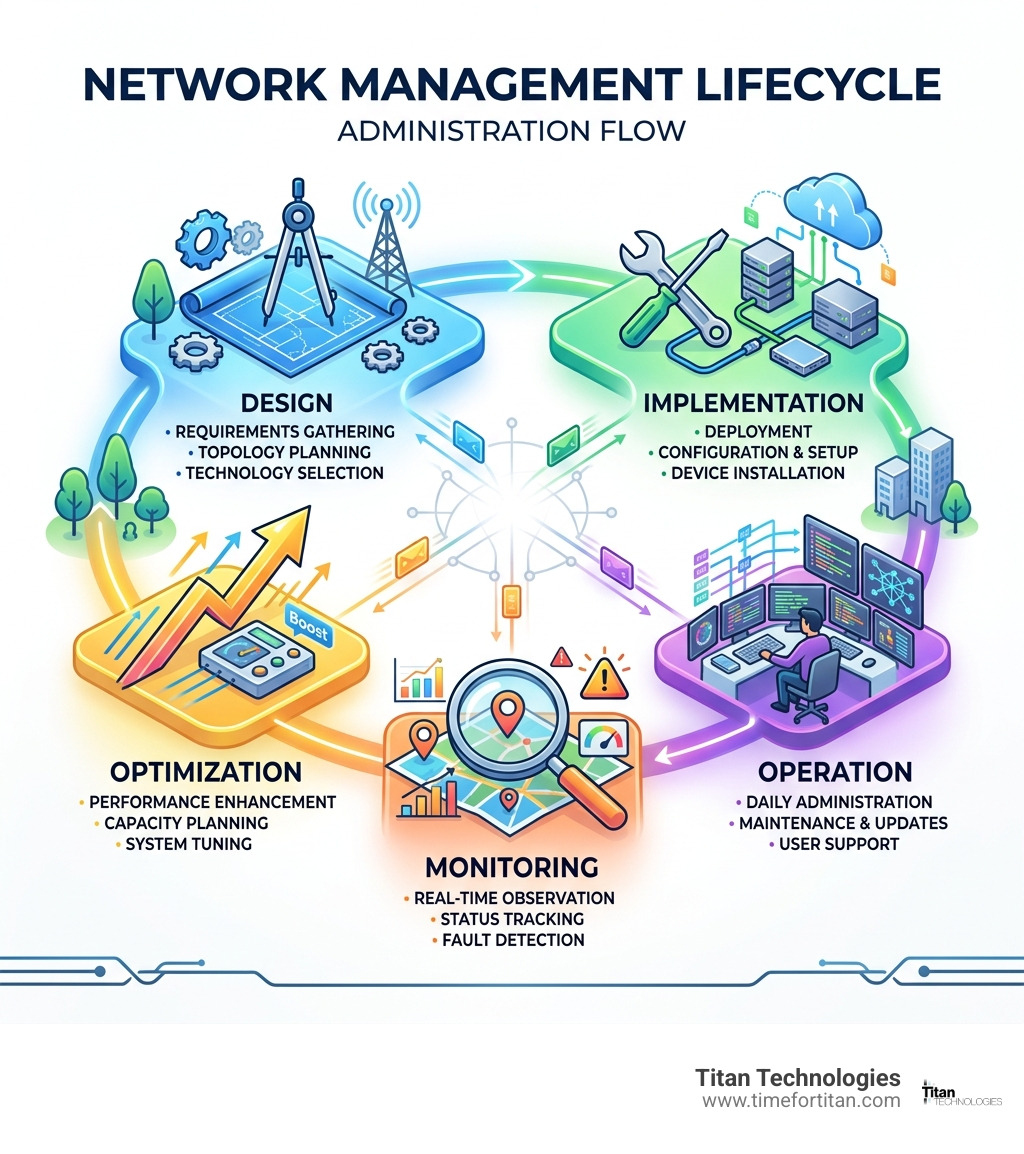
Network management and administration vocab explained:
- network configuration management
- network infrastructure management services
- network operations center services
Network Management and Administration 101
The world of network management and administration has evolved dramatically since the early days of computer networking. What started as simple connections between a handful of computers has become intricate ecosystems spanning global infrastructures, cloud environments, and billions of IoT devices.
Network Management is like having a doctor for your network—constantly checking vital signs, diagnosing issues, and prescribing treatments to keep everything running smoothly.
Network Administration is more like the daily caretaking—handling routine tasks, making adjustments, and ensuring users have what they need to stay productive.
Today’s networks are far more diverse than in the past:
- LAN (Local Area Network) – Your office computers connected like a digital neighborhood
- WAN (Wide Area Network) – Connecting multiple offices across town or around the world
- SD-WAN (Software-Defined WAN) – Intelligent traffic routing for better performance
- Cloud Networks – Virtual networks in data centers maintained by providers like Microsoft, Amazon, or Google
To manage these networks, administrators rely on key technologies:
- SNMP (Simple Network Management Protocol) – The workhorse of network monitoring since the early 1990s
- Streaming Telemetry – Real-time data without waiting to be asked
- NETCONF/YANG – Programmable way to configure network devices
The foundation for comprehensive network management and administration remains the FCAPS model developed by the International Organization for Standardization—covering Fault, Configuration, Accounting, Performance, and Security.
Key Terms Every Beginner Should Know
- Latency – The time it takes data to travel from point A to point B (milliseconds)
- Throughput – The amount of data your network can handle (megabits/gigabits per second)
- QoS (Quality of Service) – Ensuring critical applications get priority treatment
- Uptime – Network reliability, with top systems achieving “five nines” (99.999%)
- SLAs (Service Level Agreements) – Defined expectations with service providers
- MIBs (Management Information Bases) – Configuration information stored in network devices
- Topology – The physical and logical arrangement of your network
For those interested in how operating systems handle networking, our article on Network Management in Operating System provides deeper insights.
Why “Network Management and Administration” Matters
Business Continuity is threatened every time your network hiccups. In today’s digital-first world, even brief outages can bring operations to a halt.
Productivity suffers tremendously from network issues. Studies show the average employee loses up to 38 hours annually—nearly a full work week—just waiting for technology problems to be resolved.
Security Posture depends heavily on network management. Networks are prime targets for cybercriminals, and effective management includes continuous monitoring for threats.
Regulatory Compliance requirements continue to grow more complex. Whether it’s HIPAA, PCI DSS, or GDPR, network management helps ensure you stay compliant.
Cost Control is another major benefit. Proactive management prevents expensive emergency repairs, extends equipment life, and optimizes resource utilization.
FCAPS Framework and Daily Administrator Responsibilities
The FCAPS framework remains the gold standard for organizing network management and administration functions. Even though it was created decades ago, it continues to provide an excellent structure for keeping networks running smoothly.
Let’s break down what FCAPS means in practical terms:
F – Fault Management is about detecting issues quickly, determining their causes, and restoring service. Proactive monitoring prevents most serious network outages before they impact operations.
C – Configuration Management tracks settings and changes on network devices. This includes maintaining accurate records, controlling change processes, and ensuring configurations are backed up regularly.
A – Accounting Management helps you understand resource usage patterns for effective planning. This isn’t just about billing—it’s about optimizing resource allocation.
P – Performance Management ensures your network delivers the speed and reliability your business needs by measuring response times, identifying bottlenecks, and planning for growth.
S – Security Management protects your valuable data and systems from threats through access controls, threat monitoring, and regular security assessments.

In the real world, network administrators translate these framework components into daily tasks:
| FCAPS Component | Real-World Administrator Tasks |
|---|---|
| Fault Management | – Responding to alerts and tickets – Troubleshooting connectivity issues – Restoring services after outages |
| Configuration Management | – Deploying new network devices – Updating firmware and software – Documenting network changes |
| Accounting Management | – Generating bandwidth usage reports – Allocating costs to departments – Managing service provider contracts |
| Performance Management | – Monitoring application response times – Analyzing network traffic patterns – Planning for capacity upgrades |
| Security Management | – Implementing firewall rules – Patching security vulnerabilities – Investigating security incidents |
Configuration Management Essentials
Among all FCAPS components, configuration management often demands the most attention as it forms the foundation for everything else.
Baseline configurations are standardized settings that ensure consistency and security. Establishing these baselines immediately improves network stability.
Configuration backups are your safety net. Capturing configurations before and after changes creates a detailed history of your network’s evolution, saving countless hours when things go wrong.
Configuration rollbacks allow you to quickly revert to a previous working state when changes cause unexpected problems.
For deeper insights, check out our guide on Network Configuration Management.
Routine Tasks of a Network Administrator
Beyond FCAPS, network administrators handle various day-to-day responsibilities:
Device provisioning involves properly setting up new equipment from the start.
Patching and updates are critical for security and performance.
Access control management ensures the right people have appropriate access to network resources.
User support addresses connectivity and access issues that impact productivity.
Log review and analysis helps identify potential issues before they impact users.
Documentation maintains accurate records of network topology, IP addressing schemes, and procedures to ensure consistency and speed troubleshooting.
Technologies, Tools, Automation, and Cloud Models
The world of network management and administration tools has evolved dramatically. Today’s IT professionals have a rich toolkit that makes managing networks more efficient and proactive.
While Command-Line Interface (CLI) remains powerful for advanced tasks, most administrators now use Web Management Interfaces (WMIs) that offer intuitive graphical controls. The real game-changer has been Application Programming Interfaces (APIs) that allow programmatic control and automated workflows.
Software-Defined Networking (SDN) separates the control plane from the data plane, enabling centralized policy management. AI and machine learning are now analyzing vast amounts of network data to spot patterns and anomalies that would be impossible for humans to detect.
Modern Network Management Systems (NMS) bring these capabilities together in comprehensive platforms with unified dashboards, providing real-time monitoring, automated device findy, configuration management, and powerful analytics.

Popular Protocols & Standards for Network Management and Administration
Behind every good network management tool is a set of protocols that make everything work:
- SNMP (Simple Network Management Protocol) remains the backbone of network monitoring
- Syslog sends event notifications from network devices to logging servers
- NetFlow and IPFIX collect detailed information about IP traffic flows
- ICMP (Internet Control Message Protocol) verifies basic connectivity
- OpenConfig defines vendor-neutral data models for multi-vendor environments
- TL1 (Transaction Language 1) manages network elements in carrier environments
Automation & AI: Changing Network Management and Administration
The future of network management and administration is powered by automation and artificial intelligence:
Orchestration coordinates complex sequences of tasks across multiple systems, replacing dozens of manual configuration steps with automated processes.
Intent-based networking allows administrators to define what they want the network to do rather than specifying detailed configurations. The system translates business intents into technical configurations and continuously verifies network behavior.
Self-healing networks automatically detect and fix common issues without human intervention—rerouting traffic around failed links, restarting services, or applying predetermined fixes to known problems.
Predictive maintenance uses AI to analyze patterns in network data and identify potential failures before they occur, shifting maintenance from reactive to proactive.
For more on these technologies, check out our page on Network Operations Center Services.
Choosing the Right Model: On-Prem vs Cloud NMS
When choosing between on-premises or cloud-based network management systems, consider your specific needs:
On-premises NMS provides complete control over your data and management infrastructure, direct access to devices without internet dependencies, and potentially lower long-term costs after initial investment.
Cloud-based NMS offers accessibility from anywhere with internet access, easy scalability, vendor-managed updates and maintenance, and subscription-based pricing with lower initial costs.
Many businesses find that a hybrid approach works best, using cloud management for remote locations while maintaining on-premises solutions for core infrastructure.
Overcoming Modern Challenges—Security, Compliance, and Best Practices
Running a business network today requires balancing security and accessibility in an increasingly complex environment. Successful network management and administration now requires a multi-layered approach.
The old castle-and-moat security model no longer works. Zero-trust architecture has become essential—treating every connection as potentially hostile until proven otherwise, regardless of whether it comes from inside or outside your network.
Network segmentation acts as your internal firewall system, containing potential breaches and limiting lateral movement by attackers. The most sophisticated approaches now include micro-segmentation that can isolate individual workloads.
Multi-factor authentication has moved from luxury to necessity, especially for remote access. Even if credentials are compromised, that second verification factor stands as a critical defensive barrier.
Regular vulnerability scanning and patching remains your first line of defense, with automated patch management systems ensuring consistent implementation.
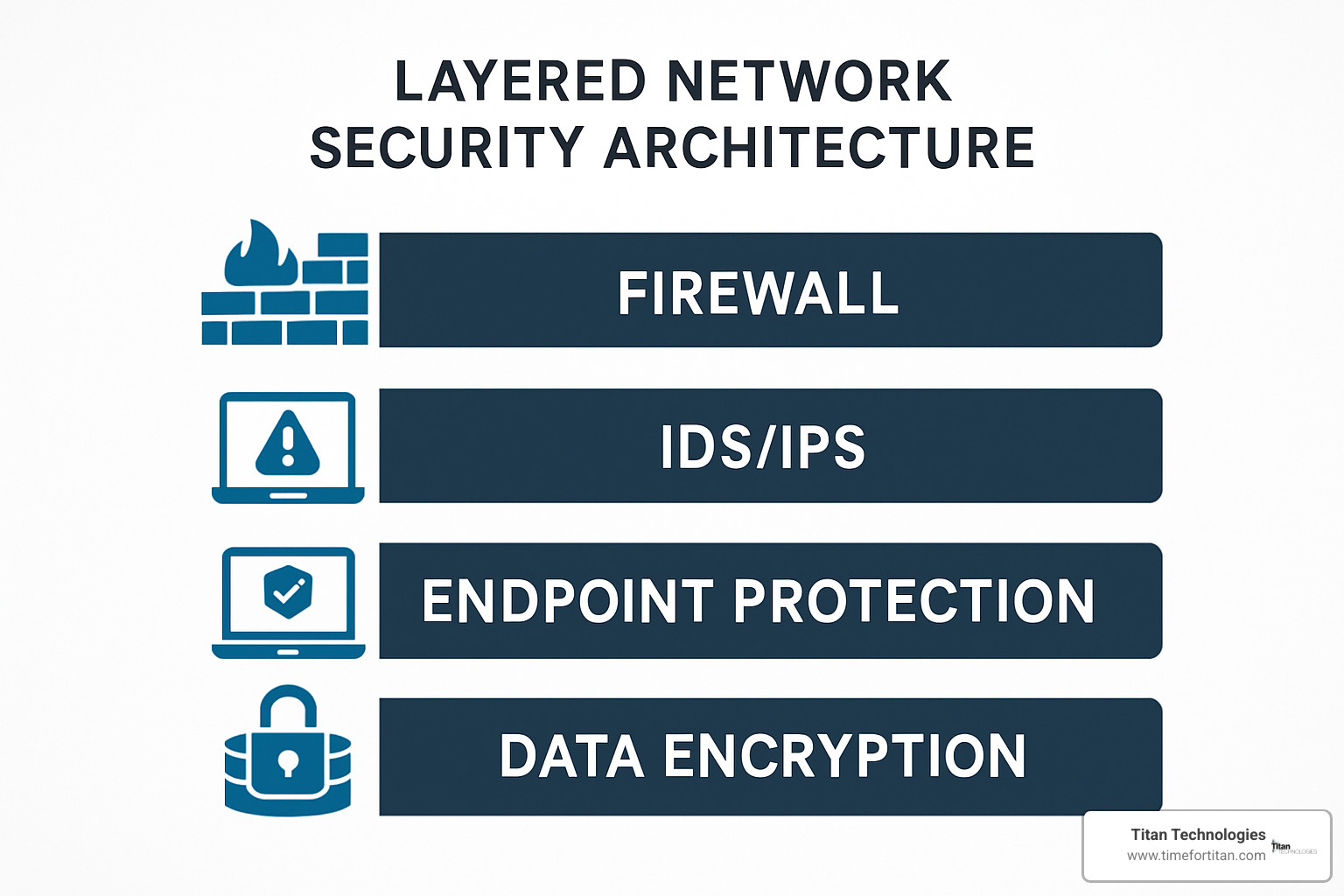
Other challenges include alert fatigue from too many notifications, multi-vendor environments requiring standardized protocols, and the need for comprehensive disaster recovery planning.
10 Proven Best Practices to Strengthen Your Network
- Maintain a comprehensive asset inventory – You can’t protect what you don’t know you have
- Map critical systems and dependencies to understand what truly matters
- Establish a regular patch cadence that works for your business rhythm
- Implement continuous monitoring to catch issues before users report them
- Invest in staff training consistently as technology changes rapidly
- Automate routine tasks to improve consistency and free up your team
- Test disaster recovery plans regularly under realistic conditions
- Implement capacity forecasting to prevent emergencies
- Review policies and procedures annually to ensure they still serve your business needs
- Manage vendor relationships and SLAs proactively
These practices align with established security frameworks like NIST Cybersecurity Framework, ISO 27001, and CIS Controls.
How Network Management Improves Security & Compliance
Effective network management and administration strengthens security and compliance in several ways:
Authentication and authorization systems ensure only the right people access the right resources, enforcing consistent policies across your entire network.
Logging and monitoring creates the audit trails that both security teams and regulators demand, making investigation of security incidents possible.
SIEM integration correlates data from multiple sources to identify potential threats that might not be apparent from individual logs.
Compliance automation verifies that network configurations adhere to required standards and policies, identifying deviations before they become audit findings.
Audit trail maintenance supports both internal governance and external compliance requirements with detailed records of all changes.
For businesses facing specific security challenges, learn more about our approach to Network Security Management.
Career Paths, Future Outlook, and FAQs
If you’re considering a career in network management and administration, you’re looking at a field with excellent growth potential. Network professionals are in high demand, with the U.S. Bureau of Labor Statistics reporting that network and computer systems administrators earn an average of $100,580 annually, with top-tier professionals commanding up to $148,710.
Career progression typically follows several common paths, from help desk to network technician to administrator to engineer and eventually architect. Others specialize in security or follow a management track toward IT director or CIO roles.
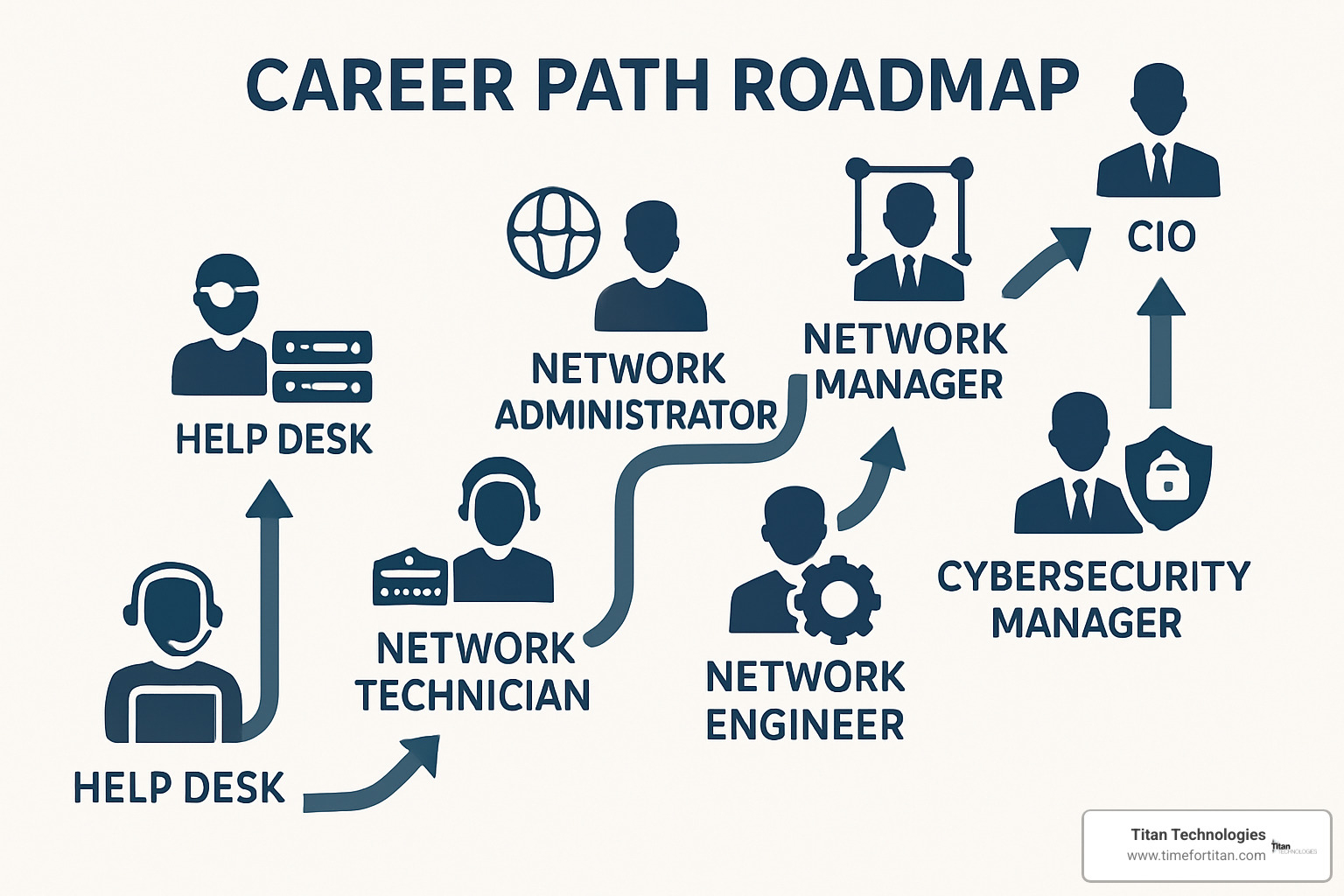
Valuable certifications include CompTIA Network+ for beginners, Cisco Certified Network Associate (CCNA) and Professional (CCNP) for Cisco environments, Juniper Networks Certified Associate (JNCIA) for Juniper equipment, and Microsoft Certified: Azure Network Engineer Associate for cloud networking.
Looking ahead, several trends are reshaping the landscape:
- 5G networks and IoT expansion with IoT devices projected to reach 25 billion by 2025
- Edge computing moving data processing closer to the source
- Sustainable networking focusing on reducing environmental footprint
The market for network management systems continues to grow at 9.4% CAGR through 2027, reaching $14.6 billion globally.
Network Management and Administration Skills You’ll Need
Success requires a blend of technical expertise and soft skills:
- Problem-solving abilities for methodical troubleshooting
- Analytical thinking to interpret data and identify patterns
- Project management skills for implementing changes with minimal disruption
- Scripting and automation knowledge (Python, PowerShell, Bash)
- Access management principles for security-conscious environments
For academic insights into emerging technologies, explore Scientific research on AI-driven management.
Frequently Asked Questions about Network Management and Administration
What is the difference between a network administrator and a network engineer?
Network administrators handle day-to-day operations—monitoring performance, troubleshooting issues, managing user access, and maintaining existing systems.
Network engineers focus more on design, architecture, and strategy—planning network expansions, evaluating new technologies, designing network topologies, and implementing major upgrades.
In smaller organizations, one person often handles both roles, while larger enterprises typically separate these responsibilities.
Which tools are essential for small-business network management?
Small businesses need:
- A good network monitoring solution to track device status and performance
- Robust firewall management tools for security protection
- Patch management systems to automate security updates
- Backup and recovery tools to preserve configurations and critical data
- Remote access management solutions for supporting hybrid work environments
How does automation reduce network downtime?
Automation reduces downtime through:
- Proactive issue detection to spot warning signs before outages occur
- Consistent configuration that eliminates human errors
- Rapid response capabilities that immediately address certain failures
- Gathering diagnostic information and suggesting fixes when manual intervention is needed
Our clients typically see downtime reduced by 60-80% after implementing appropriate automation.
Conclusion
Your business network isn’t just a collection of cables and blinking lights—it’s the digital backbone that keeps your entire operation running. As we’ve explored throughout this guide, effective network management and administration has become essential for businesses that want to stay competitive and secure.
The days of “set it and forget it” networks are long gone. Today’s interconnected systems demand structured, proactive approaches—from the time-tested FCAPS framework to cutting-edge AI-driven tools that can predict problems before they happen.
Here at Titan Technologies, we’ve spent years helping businesses across Central New Jersey overcome their network challenges. We understand that most local companies don’t have the resources to maintain specialized IT teams with deep networking expertise. That’s exactly where we come in.
Our approach combines technical excellence with a genuine understanding of what New Jersey businesses need—reliable systems that just work, security you can count on, and support that’s there when you need it.
What makes our clients stick with us year after year?
- We catch problems before they impact your business through comprehensive proactive monitoring
- We align your technology with your business goals through strategic planning sessions
- We build security into everything we do, not as an afterthought
- We stand firmly behind our work with a 100% satisfaction guarantee
- When minutes matter, our local team responds quickly to get you back on track
From Edison to Elizabeth, Lakewood to Newark, Trenton to Princeton, New Brunswick to Matawan, Woodbridge to Freehold, and Red Bank—our team serves the entire Central New Jersey region with personalized support that larger providers simply can’t match.
Ready to experience the difference that professional network management and administration can make for your business? Contact us today to learn more about our desktop & network support services and take the first step toward a more reliable, secure, and high-performing network that truly supports your business goals.