


For a CPA firm, a technology plan should do much more than identify which computers need to be replaced next year. A useful plan should give firm leadership a clear view of how technology will support the business over the next 12–24 months, including what needs to be improved, what risks need to be addressed, what investments should be budgeted for, and when significant changes should occur.
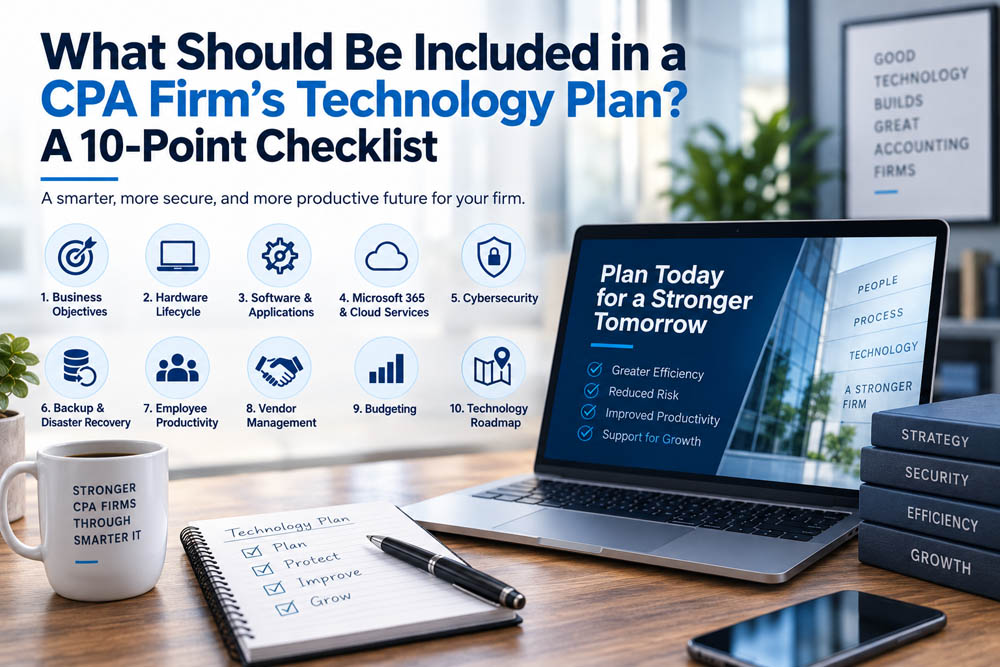
For CPA firms with 5–50 employees, a practical technology plan should address 10 core areas: business objectives, hardware lifecycle, software and applications, Microsoft 365 and cloud services, cybersecurity, backup and disaster recovery, employee productivity, vendor management, budgeting, and a documented technology roadmap.
The purpose is not to create a technical document that only an IT professional can understand. In fact, the most useful technology plans do the opposite. They translate technology into business decisions so partners and firm leaders can understand where the firm stands today, what needs attention next, and approximately what those decisions will require in time and money.
That distinction matters because technology becomes much more expensive and disruptive when every decision is made as an emergency.
A good technology plan gives a CPA firm something extremely valuable: the ability to make technology decisions before technology makes those decisions for the firm.
Why Does a CPA Firm Need a Technology Plan?
Many CPA firms do not intentionally create their technology environment all at once. It develops gradually.
A new employee joins, so another computer is purchased. The firm adopts a new application because it solves a particular problem. Microsoft 365 expands into more parts of the business. Security tools are added as threats evolve. An aging server gets replaced. Remote work introduces new requirements. Over several years, dozens of individual technology decisions accumulate.
Each decision may have been reasonable at the time.
The problem is that nobody necessarily stops to ask whether all of those decisions still work together.
That is where technology planning becomes valuable.
Instead of asking only what needs to be fixed today, leadership begins asking what the firm will need next year. Instead of discovering that 12 computers need replacement unexpectedly, the firm sees that expense coming. Instead of adding cybersecurity after a concern arises, improvements can be prioritized according to risk. Instead of implementing a major technology change immediately before tax season, the project can be scheduled for a less disruptive period.
A technology plan turns IT from a series of reactions into a business management process.
For most CPA firms, that process should include the following ten areas.
1. Start With the Firm’s Business Goals
A technology plan should begin with the business, not with technology.
Before discussing computers, cloud platforms, cybersecurity tools, or software, firm leadership and its IT partner should understand what the organization is trying to accomplish during the next 12–24 months.
Is the firm expecting to hire additional employees? Is it considering an acquisition? Will more employees work remotely? Does leadership want to improve client collaboration? Are partners preparing for succession? Is the firm trying to increase efficiency without adding staff at the same rate as revenue growth?
Each of those business decisions can create different technology requirements.
A CPA firm expecting to grow from 15 to 25 employees, for example, should not wait until employee number 24 arrives before asking whether its existing systems can support the additional users.
Technology planning should anticipate growth rather than chase it.
This is why the first question in a technology planning meeting should rarely be, “What technology should we buy?”
The better question is:
“Where is the firm going, and what will technology need to do to help us get there?”
2. Create a Hardware Lifecycle Strategy
Once the business direction is understood, the firm should evaluate the physical technology employees rely on every day.
Computers do not need to be replaced simply because they reach a particular age, but they also should not remain in service indefinitely because they still turn on.
For many business computers, 3–5 years provides a useful planning window for evaluating replacement, with the actual decision based on performance, reliability, security support, warranty status, application requirements, and employee needs.
Servers, firewalls, network equipment, wireless systems, backup devices, and other infrastructure require similar planning, although their useful lifecycles can differ.
The goal is to know what equipment exists, how old it is, and what is likely to need replacement before failure creates an emergency.
For a CPA firm, timing matters as well.
If eight computers are likely to need replacement during the next year, leadership should be able to decide whether those purchases happen together, are spread across several quarters, or are prioritized according to risk. More importantly, the replacements can be scheduled around the firm’s business calendar instead of happening unexpectedly during tax season.
Technology lifecycle planning creates control where reactive replacement creates urgency.
3. Review the Applications the Firm Depends On
Technology planning should also consider the software employees use to perform their work.
CPA firms often accumulate applications over many years, and those applications may become deeply embedded in business processes. Some are essential, while others may overlap with tools the firm already owns or no longer reflect how employees actually work.
A technology plan provides an opportunity to ask whether the current application environment still makes sense.
Which applications are business-critical? Are employees using them effectively? Are there multiple products performing similar functions? Are any applications approaching the end of vendor support? Are there integrations that regularly create problems? Are employees relying on manual workarounds because two systems do not communicate effectively?
The purpose is not necessarily to replace software.
It is to understand what the firm depends on and identify where applications are creating unnecessary cost, risk, or inefficiency.
This is particularly important before major software changes. Migrating a critical accounting or document-management application is not simply an IT project. It affects employees, workflows, training, clients, and potentially the firm’s busiest periods.
A technology plan allows those changes to happen deliberately.
4. Include Microsoft 365 and Cloud Strategy
For many CPA firms, Microsoft 365 has become part of the firm’s core infrastructure.
Email, calendars, Teams, OneDrive, SharePoint, identity, and other cloud services may be involved in daily operations, which means Microsoft 365 should be actively managed as part of the technology plan rather than treated simply as a collection of licenses.
The firm should understand how accounts are secured, how information is shared, how employees are added and removed, whether licensing still reflects actual needs, and how Microsoft 365 fits with other business applications.
Cloud strategy also needs to consider how employees work.
If accountants need secure access from home, client locations, or while traveling, the technology plan should support that flexibility without sacrificing appropriate security.
The question is not whether the firm should “move to the cloud” simply because cloud technology is popular.
The better question is whether the firm’s cloud services are being used intentionally, securely, and efficiently.
5. Build Cybersecurity Into the Plan Instead of Adding It Later
Cybersecurity deserves its own place in every CPA firm’s technology plan because the firm handles information clients expect it to protect.
A cybersecurity strategy should not develop entirely through individual purchases made after something concerning happens.
Instead, the firm and its IT partner should periodically evaluate the overall security environment and identify which risks deserve attention first.
That includes protecting employee identities, computers, email, cloud services, and sensitive information while also considering employee awareness and ongoing monitoring.
The important concept is layering.
No single security tool can protect a firm from every threat. Strong security comes from multiple protections working together so that one mistake or one compromised password does not automatically become a major incident.
Cybersecurity planning also gives leadership the opportunity to budget improvements.
If additional security protections are needed next year, those investments should ideally appear on the technology roadmap rather than arriving as an unexpected proposal after budgets have already been established.
For CPA firms, cybersecurity is not separate from technology planning.
It is one of the most important reasons technology planning exists.
6. Document Backup, Recovery, and Business Continuity
A technology plan should address not only how the firm operates when everything is working but also what happens when something goes wrong.
Most firms understand the need for backups, but leadership should know more than whether a backup system exists.
If a critical application or server became unavailable tomorrow morning, what would happen? How much recent information could potentially be lost? Which system would be restored first? Approximately how long could recovery take? How would employees continue working while restoration was underway?
These are business questions, not merely technical questions.
A commonly used approach is the 3-2-1 backup framework, which recommends maintaining three copies of important information using two different storage methods, with at least one copy separated from the primary environment.
Whatever strategy the firm uses, recovery should be tested.
The middle of a serious outage is the worst possible time to discover that assumptions about backups were incorrect.
A technology plan should therefore include both protection and verification: how information is being backed up and how the firm knows recovery will work when needed.
7. Look for Opportunities to Improve Employee Productivity
Technology planning should not focus exclusively on risk.
It should also ask whether technology is helping employees work effectively.
Small inefficiencies are easy to ignore because employees adapt to them. A computer takes several extra minutes to start, an application requires unnecessary manual steps, employees enter the same information into multiple systems, or staff members have developed workarounds for a problem that has existed so long that nobody considers it unusual anymore.
Individually, these issues may appear minor.
Across 20, 30, or 50 employees, they can represent a significant amount of lost time.
A useful technology planning process should therefore include conversations with employees and managers about what slows them down.
Sometimes the solution is new technology. Sometimes it is better configuration, additional training, automation, or simply fixing a process that has been unnecessarily complicated for years.
The goal should not be to introduce technology for technology’s sake.
It should be to remove friction from the work employees already need to perform.
8. Understand Your Technology Vendors and Dependencies
Most CPA firms rely on more technology vendors than leadership realizes.
There may be an internet provider, Microsoft licensing partner, accounting software vendors, cloud providers, cybersecurity platforms, telecommunications services, hardware vendors, backup providers, and other third parties supporting different pieces of the environment.
A technology plan should provide visibility into those dependencies.
Which vendors support business-critical services? Who is responsible for managing each relationship? When do agreements renew? Are there redundant products? Are there vendors whose failure would significantly disrupt operations?
This becomes particularly important when a serious issue occurs.
Employees should not need to determine during an outage whether the internet provider, software company, or IT provider is responsible for resolving the problem.
A managed IT partner can help coordinate those relationships so the CPA firm is not forced to become the intermediary between several technical vendors.
That coordination is often an overlooked part of technology management.
9. Build a Predictable Technology Budget
One of the most valuable outcomes of a technology plan is financial predictability.
Without a roadmap, technology expenses can appear unexpectedly. Several computers fail in the same year. A server suddenly needs replacement. A cybersecurity concern creates an unplanned project. Software licensing changes. A major system reaches the end of support.
Individually, each expense may be reasonable.
Collectively, they can make technology feel unpredictable.
A 12–24 month technology budget helps leadership anticipate many of those expenses before they occur.
If five computers will likely need replacement next year, that investment can be budgeted. If a security improvement is recommended, leadership can determine when it should happen. If a significant migration is likely within 18 months, planning can begin long before the project becomes urgent.
The objective is not to predict every dollar perfectly.
Technology will always contain some surprises.
The objective is to turn as many surprises as possible into planned business decisions.
10. Turn Everything Into a 12–24 Month Technology Roadmap
The final component brings the other nine together.
A technology plan should ultimately become a roadmap showing what needs attention, why it matters, approximately when it should happen, and what the expected investment or business impact may be.
Not every recommendation should receive the same priority.
Some issues may create immediate security or reliability concerns and should be addressed quickly. Others may improve productivity but can reasonably wait several months. Some investments may be valuable but should deliberately be scheduled after tax season.
A useful roadmap creates sequence.
What needs attention now? What should happen next quarter? What should be budgeted for next year? What can wait?
This is what transforms a technology assessment into a technology strategy.
Without prioritization, a firm receives a list of recommendations.
With prioritization, leadership receives a plan.
What Could a Technology Plan Look Like for a 25-Person CPA Firm?
Consider a Central New Jersey CPA firm with approximately 25 employees that has grown steadily over several years.
The firm’s technology is functioning, but most decisions have been made individually as needs arose. Computers were purchased at different times, Microsoft 365 has gradually become more important, several applications are essential to daily operations, and cybersecurity tools have been added as threats evolved.
A technology planning process might reveal that six workstations should be considered for replacement during the next 12 months, Microsoft 365 permissions need review, a recovery test should be scheduled, employees would benefit from additional security awareness training, and a larger technology project should be deliberately postponed until after the firm’s busiest period.
None of those findings necessarily represents an emergency.
That is precisely the value of the exercise.
Instead of waiting until six unrelated issues become six separate emergencies, leadership can see them coming and decide how they fit into the firm’s budget and calendar.
The technology plan gives the firm time to make good decisions.
For Titan, this section should eventually be strengthened with a real client scenario showing what was discovered during a technology review, how the recommendations were prioritized, and what measurable improvement resulted.
How Often Should a CPA Firm Review Its Technology Plan?
A technology roadmap should not be created once and placed in a folder.
The business will change, technology will change, security threats will change, and priorities will change.
At a minimum, CPA firm leadership should have a meaningful technology planning conversation at least annually, while higher-priority items and progress against the roadmap should be reviewed more frequently throughout the year.
For many firms, quarterly discussions can be useful because they allow leadership and the IT provider to review what has been completed, what has changed, and what is coming next without waiting an entire year.
The purpose is not to hold meetings simply for the sake of discussing technology.
The purpose is to prevent important technology decisions from becoming urgent because nobody discussed them early enough.
The 10-Point CPA Firm Technology Planning Checklist
A strong technology plan should ultimately give leadership confidence in ten areas: the firm’s business objectives, hardware lifecycle, critical applications, Microsoft 365 and cloud services, cybersecurity, backup and recovery, employee productivity, technology vendors, budgeting, and a prioritized 12–24 month roadmap.
If leadership cannot clearly explain where the firm stands in several of these areas, that does not automatically mean something is wrong.
It does mean those areas deserve attention.
The purpose of the checklist is not to find fault. It is to create visibility.
And visibility gives leadership the ability to prioritize.
How Titan Helps CPA Firms Build a Technology Roadmap
Titan’s role in technology planning is to connect technical decisions with business priorities.
For CPA firms with 5–50 employees, that means looking beyond today’s support tickets and considering what the firm will need over the next year or two. Which equipment is approaching replacement? Where are the largest cybersecurity risks? Are recovery capabilities appropriate? Is Microsoft 365 being managed effectively? Are there recurring problems affecting employee productivity? What technology investments should leadership anticipate?
The answers become a roadmap that allows the firm to prioritize improvements, establish budgets, and schedule significant changes around the business calendar.
The objective is not to create a long list of technology projects.
It is to identify the right projects, in the right order, at the right time.
Before publication, Titan should strengthen this section with actual proof points such as the number of CPA firms supported, years of experience, technology and cybersecurity certifications, Microsoft credentials, and a real example of a technology roadmap that produced measurable results.
Those details matter because specificity turns a claim of expertise into evidence of expertise.
Final Takeaway: A Technology Plan Should Give CPA Firm Leadership Fewer Surprises
A strong technology plan is not really about computers, servers, cloud services, or cybersecurity products.
It is about helping leadership make better decisions.
For CPA firms, that means having visibility into 10 areas: business goals, hardware, applications, Microsoft 365 and cloud services, cybersecurity, backup and recovery, employee productivity, vendors, budgeting, and a 12–24 month roadmap.
When those areas are reviewed together, technology becomes easier to manage because leadership can see what is coming.
Equipment replacements can be budgeted before computers fail. Security improvements can be prioritized before an incident exposes a weakness. Major projects can be scheduled around tax season. Growth can be supported before new employees arrive. Recovery plans can be tested before they are needed.
A good technology plan does not eliminate every surprise.
It simply makes far fewer of them necessary.
For CPA firm leadership, the most important technology question is therefore not:
“What do we need to buy next?”
It is:
“What will our firm need from technology over the next 12–24 months, and what should we be doing today to prepare for it?”